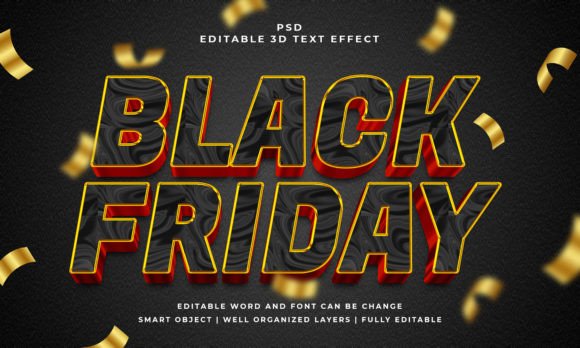
Give Your Text Instant Depth: The Black 3D Editable PSD Effect
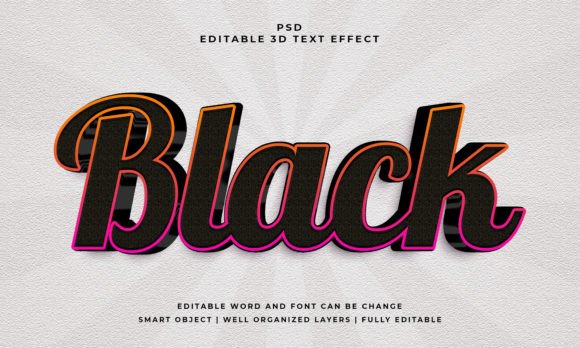
There is a specific moment in every designer's workflow where flat text just doesn't cut it anymore. You have the perfect font, the right color palette, and a solid layout, but the headline still feels like it’s floating aimlessly in the background. This is often the moment where projects stall, especially when you are trying to create high-impact visuals for posters, YouTube thumbnails, or merchandise. If you have ever found yourself wrestling with Photoshop layer styles for hours, trying to get that perfect bevel and shadow just right, you know the frustration. That is why resources like the Black 3D Editable PSD Text Effect have become such a staple in the modern creative’s toolkit. It bridges the gap between a static idea and a polished, tactile final product without requiring you to be a 3D modeling expert.
More Than Just a Filter: The Value of Smart Object Workflows
What separates a generic effect from a genuinely useful design asset is often found in the file structure. We have all downloaded files that were a mess of locked layers and rasterized text, forcing us to start from scratch anyway. The defining characteristic of a high-quality PSD text effect is the use of Smart Objects. When you download a resource built around this technology, the workflow is fundamentally simplified. You simply open the file, locate the designated Smart Object layer (usually clearly labeled), and double-click it. This opens a separate window where you can replace the placeholder text with your own typography or vector shapes. Once you save that window, the 3D effect automatically maps to your new text. It is a non-destructive workflow that preserves the integrity of the lighting, shadows, and depth mapping while giving you 100% control over the content. This means you are not just buying a static image; you are buying a reusable engine for generating graphics.
Practical Applications: From Branding to Social Media
The versatility of a well-crafted 3D effect extends far beyond simple headers. Because the Black 3D Editable PSD Text Effect works with text, vector shapes, and custom logos, it becomes a multipurpose tool for various project types. Consider the needs of a small business owner launching a new product line. You might need a bold visual for an Instagram announcement, a header for your email newsletter, and a label design for the packaging. Using this single effect, you can maintain strict visual consistency across all these touchpoints.
Here are a few specific scenarios where this type of asset shines:
- Social Media Graphics: In a scroll-heavy environment, depth catches the eye. A 3D title on a Facebook event cover or a LinkedIn banner can increase click-through rates by making the post look more substantial than standard flat text.
- Logo Design: While a primary logo should usually be vector-based and scalable, having a 3D version for watermarks, intros, or merchandise (like t-shirts and mugs) adds a layer of professionalism.
- Editorial Layouts & Blogs: If you are designing a magazine cover or a blog header, a textured 3D effect adds a tactile quality that draws readers in, suggesting that the content inside is premium and well-produced.
- Event Invitations: For parties, conferences, or launches, the "black" aesthetic offers a sleek, modern, and slightly mysterious vibe that works well for evening events or tech-focused gatherings.
The "black" aspect of this specific effect is particularly strategic. Black is the ultimate neutral; it implies luxury, authority, and mystery. When rendered in 3D, it creates deep shadows and bright highlights that give the text a physical presence. It pairs well with almost any background color, making it a safe yet stylish choice for brand identity projects.
Designing for Impact: Readability and Pairing
While the visual appeal of a premium font effect is undeniable, it is crucial to apply it with a strategist's mindset. The primary goal of any typography is communication. If the 3D effect is too aggressive or the lighting too complex, it can actually hinder readability. The beauty of an editable PSD file is that you can test different typefaces to see how the effect interacts with the letterforms.
For instance, a bold, wide sans serif font often takes to 3D beveling better than a delicate script font, which might lose legibility if the shadows are too deep. However, you won't know until you try. This is where the "editable" feature pays dividends. You can swap out a modern typography style for a classic serif to see which one holds the effect better without becoming muddy.
When using a heavy effect like this, consider the surrounding design elements. If your headline is a bold, textured 3D black, your body copy should likely be clean and flat to provide contrast. This balance ensures that your visual hierarchy remains intact. You want the viewer's eye to be drawn to the 3D element first, then easily transition to the supporting information.
Technical Considerations for Print and Web
The included specifications—a resolution of 2000x1200 pixels and RGB color mode—indicate that this asset is optimized for digital use. This makes it perfect for web design, screen presentations, and social media graphics. However, if you are planning to use this for print materials like posters or flyers, there are a few things to keep in mind.
First, always check the resolution against your print requirements. While 2000px is great for web, large format printing might require you to upscale the image or work at a smaller physical size. Second, remember that this file is in RGB. Professional print shops usually require CMYK. While you can convert the file, be aware that the vibrant highlights in 3D effects can sometimes shift slightly when converting from screen to print gamut. It is always worth doing a test print or asking for a proof.
For digital products, however, the setup is ideal. The file includes a JPEG preview, which is helpful for client presentations or mood boards, but the real work happens in the PSD. This allows you to export transparent PNGs, which are essential for layering your text over video backgrounds or complex photography in your marketing assets.
Streamlining Your Creative Process
Ultimately, tools like the Black 3D Editable PSD Text Effect are about efficiency. In the fast-paced world of content creation and small business management, time is a resource you cannot afford to waste. Spending three hours manually crafting a 3D text effect in Photoshop might be a valuable learning experience once, but when you need to produce daily content or a full suite of branding materials, you need a shortcut that doesn't sacrifice quality.
By utilizing a well-organized template with clear layers and Smart Object integration, you can produce professional-grade design assets in minutes rather than hours. Whether you are a content creator looking to spice up your thumbnails, a graphic designer streamlining client deliverables, or a hobbyist making invitations for a special event, having a library of reliable, editable effects is a game-changer. It allows you to focus on the message and the strategy, rather than getting bogged down in the technical minutiae of drop shadows and gradients. The result is a more polished, consistent, and engaging visual presence across all your projects.