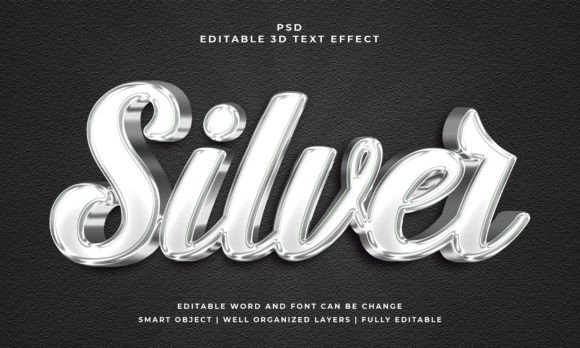
Achieve a Polished, Metallic Look with a Silver Text Effect
There’s a certain kind of visual confidence that comes with metallic finishes. It’s the reason a polished chrome bumper catches your eye or why a brushed aluminum laptop feels more premium. That same sense of quality and sophistication is exactly what a well-crafted silver text effect can bring to your creative projects. It’s not just about making letters shiny; it’s about adding a layer of depth, texture, and undeniable polish that instantly elevates your message. Whether you’re crafting a logo for a new tech startup, designing an elegant wedding invitation, or creating a bold social media graphic, this versatile design asset offers a shortcut to a high-end look.
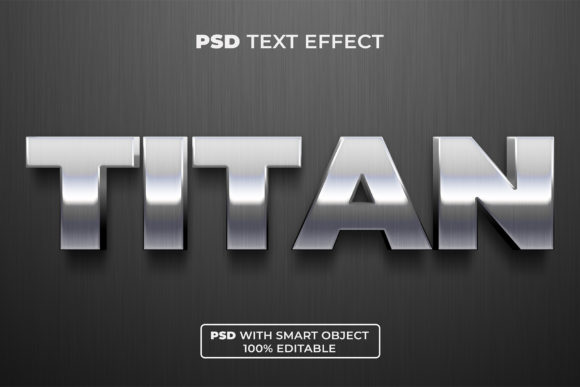
The true power of a dedicated silver text effect style lies in its realism and ease of use. Forget spending hours trying to manually paint highlights and shadows to simulate metal. A premium effect, often built with smart object layers, handles the complex work of light, reflection, and beveling for you. You simply double-click the smart object, type your own text, save, and watch your words transform into gleaming silver. This non-destructive workflow means you can experiment freely with different fonts and phrases without breaking the effect. The included high-resolution PSD file, typically at 300 DPI, ensures your final design looks crisp whether it’s on a business card or a large-format poster.
Where This Metallic Style Truly Shines
Understanding the practical applications of this effect helps you leverage its strengths. It’s more than just a decorative filter; it’s a strategic design choice.
For branding and logo design, a silver text effect can convey innovation, precision, and luxury. It’s particularly effective for industries like finance, technology, consulting, and high-end services where trust and quality are paramount. Imagine a law firm’s letterhead or a software company’s logo with a subtle, elegant silver finish—it immediately sets a professional tone.
In packaging design, this effect can make product names stand out on shelves, especially for cosmetics, spirits, gourmet foods, or tech accessories. It suggests premium quality before the customer even reads the label. Similarly, on merchandise like apparel, mugs, or phone cases, silver lettering adds a custom, upscale feel that customers love.
For digital and print marketing, the applications are endless. Use it for attention-grabbing social media graphics, webinar titles, or YouTube thumbnails. In print materials like flyers, brochures, and posters, it helps key information or event names pop. Editorial layouts in magazines or blog headers can use it for article titles to draw readers in. Even invitations for galas, awards ceremonies, or milestone celebrations gain instant elegance with a silver text treatment.
Pairing Fonts and Making It Your Own
The effect itself is a container; the font you put inside it defines the personality. This is where your design skill comes into play. The smart object system allows you to use any font you have installed, from bold sans-serifs to elegant serifs or flowing scripts.
A clean, geometric sans serif font paired with the silver effect creates a modern, tech-forward vibe perfect for an app interface or a startup’s branding. A classic, sturdy serif font will feel more traditional and authoritative, ideal for a financial institution or a luxury book title. A flowing script font can turn the silver effect into something romantic and sophisticated, perfect for wedding stationery or boutique branding. The key is to match the font’s inherent character with your project’s goal.
Always test font pairings. Your headline might be in the silver effect, but your body copy needs to be highly readable. Choose a complementary, simpler font for longer text blocks. Consider readability above all; a highly decorative script might look beautiful in the effect but could be challenging to read at small sizes. View your design at various scales to ensure it works everywhere.
Remember to check the licensing of both the effect and your chosen font, especially if your project is commercial. Most premium design assets come with clear licenses for broad use, but it’s always your responsibility to verify.
More Than Just a Pretty Surface
Integrating a consistent visual element like a silver text effect across your assets does more than just make things look good. It contributes directly to visual consistency, a cornerstone of strong brand identity. When your website header, social media posts, and printed materials share a cohesive metallic style, it reinforces your brand’s aesthetic and makes it more memorable. This consistency builds professional presentation, signaling to your audience that you pay attention to detail.
Ultimately, the goal is audience engagement. A striking, textured headline is far more likely to stop a scrolling thumb on Instagram or draw the eye in a crowded inbox than flat, plain text. It adds a tactile quality to digital designs, making them feel more substantial and worthy of attention. This isn’t about following a trend; it’s about using a versatile design asset to communicate your message with greater impact and clarity.
So, whether you’re a small business owner crafting your first brand identity, a content creator looking to upgrade your visuals, or a designer seeking a reliable tool for client work, exploring the potential of a silver text effect is a practical step. It’s a focused solution for adding that coveted touch of polish and professionalism that helps your work stand out in a visually noisy world.